It is mandatory for all the advertiser partners & affiliate marketers to add advertisers to their panel to create any campaign or before creating the API integration. No worries, we have got you covered. Adding an advertiser on your Trackier is quite an easy task. There are normally 4 ways in which partners can add advertisers on their panel.
- API Post method
- Share the login domain, so that create their own account
- Uploading a CSV file
- Manually adding the panel
Manually Adding The Advertiser On The Panel
Here are the steps you can follow:
Step 1
Partners can add the advertisers using this simple form. Just follow the flow mentioned here Advertiser > Manage > Action Button > Add New Advertiser.
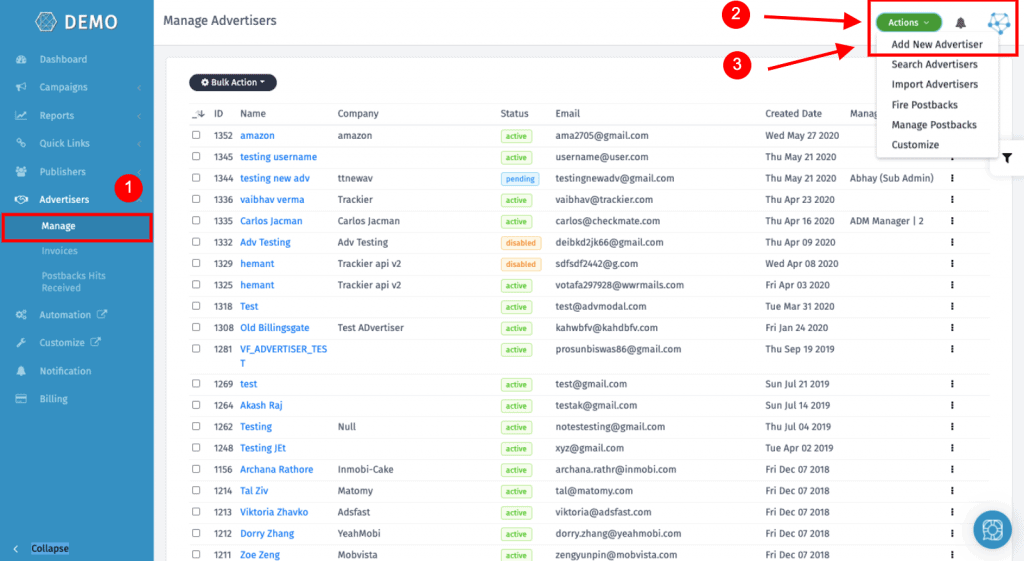
Step 2
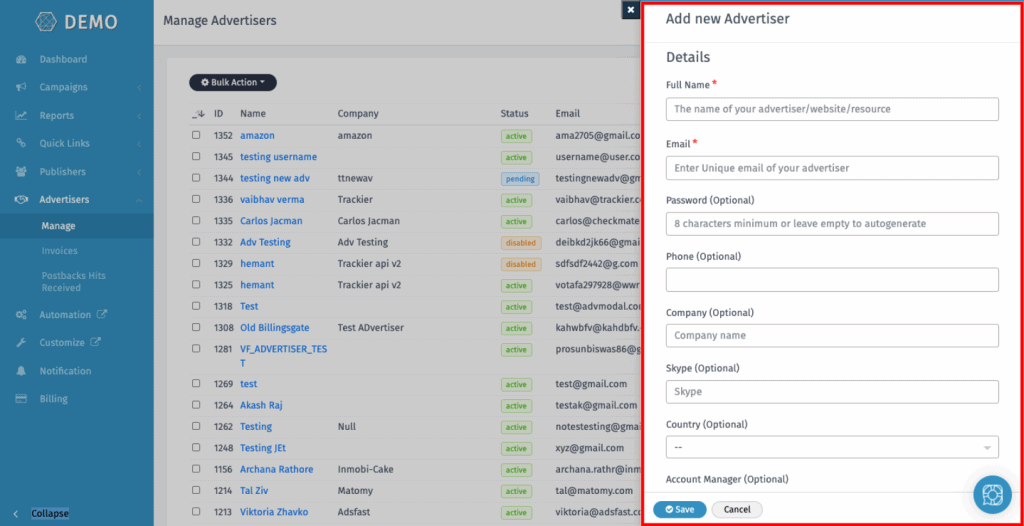
After this, a form will appear on the right side of the panel. You can simply add the required details as per your own need. You can also customize the questions in the sign-up form as well & assign an Account Manager to them but before that, you need to add a team member with the role of Advertiser Manager.
In case if you face any issue while following this method, please do mail us at support@oldtrackierwebsite.trackier.com.
API Post Method
You can also use the API post method to add advertisers on your panel by just following these easy steps mentioned in our API docs.
Uploading The CSV File
In Trackier, you can simply add & bulk upload new advertiser data. This in turn can help you to Migrate from any of your existing platforms to Trackier very easily and efficiently. In this step, you can simply upload the CSV file containing the advertiser data following the steps mentioned here to add bulk advertisers data under Trackier.
Another method that can be used by partner affiliate networks to add their advertisers is by sharing the login domain with the advertiser so that they can create their own account on the panel add their campaign details.
So there you have it, these are the primary methods via which you can add Advertisers on your panel. If you have any queries regarding the addition of an advertiser on your panel, please refer to this article, or you can even reachout to us at support@oldtrackierwebsite.trackier.com.