We are glad that we introduced Postback Logs and Pixel logs in our Last Newsletter and this results in the raised number of issues related to the Postback Logs and Pixel Logs. We are happy that this feature seems to be problem-solving for the Networks. In this Article, I will discuss some Error Message in the Pixel Logs and the Postback Logs.
In simple words:
Postback Logs: Exchange of information between servers to report a user’s action on a website, network, or app
Pixel Logs: Track user behaviour, site conversions, web traffic, and other metrics similar to a cookie
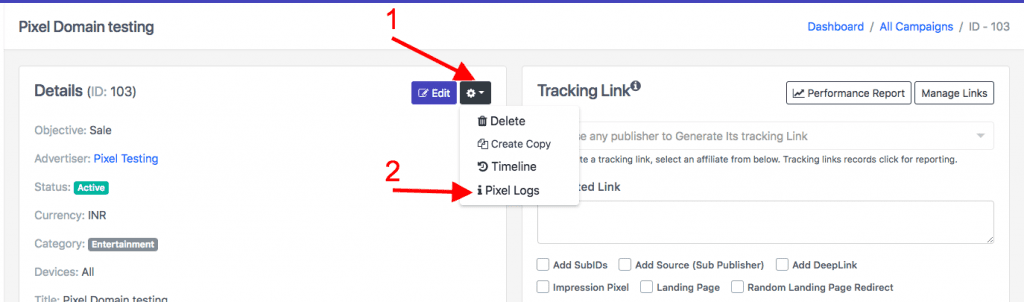
Pixel Log check in Trackier:
A quick reminder, pixel logs can be check from the campaign manage>> click on the campaign >> click on gear button>> click on Pixel Log drop down.
Error Messages in Pixel Logs:
- Case 1: EMPTY: This means the Advertiser didn’t place the Pixel code into the thank you page. This is due to the server able to communicate with the thank you page but captured nothing from the thank you page.
- Case 2: NO_SESSION_ID: This is the general error message. We show this error When the click is not attributed to the users. This error is due to some unfilled form using our tracking link No session ID means user did not click on our tracking link or the user has cleared his cookies data. If you refresh the thank you page, again and again, you’ll see this error in the pixel logs again and again.
- Case 3: DUPLICATE_CLICK_ID: When a conversion is fired, the server will check to see if the click ID has been used to track conversions on their end. If the Click ID has been used already, and the campaign has not been explicitly allowed to track multiple conversions per click ID, any subsequent conversions using the same click ID will come back as rejected, throwing this server log response.
- Case 4: INVALID_GOAL_ID / INVALID_GOAL_VALUE: If you have set the goals in a campaign, then this is an error occurred informing you that the Goal Id / the Goal Values is incorrect. More than likely, there isn’t a valid Goal ID or Goal value in the tracking link or there is a weird character that isn’t valid for Goal ID or Goal value. Or the request includes no Goal ID or Goal value because the tracking link isn’t being created or formatted correctly.
Debug Postback Logs in Trackier:
Postback log is the summary of the notice and error messages for conversions in your network.
- Notice: Notifications for certain intended actions,
- Error: Notifications for certain unexpected behaviours.
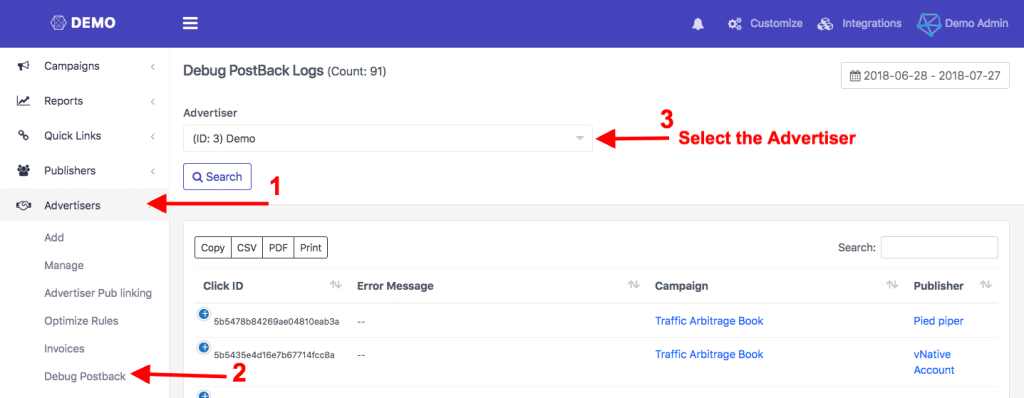
You can access the Postback Logs from, Advertiser >> Debug Postback >> Select the Advertiser. Below are some notices messages responses from the servers.
Some Commonly used notice and Error Messages in Postback Logs and Debug Postback:
Case 1: INVALID_CLICK_ID:
This means the advertiser is passing wrong Click Id. When the advertiser calls the Postback URL, they need to include the Click ID value that you passed to them on click into the campaigns Postback URL to record a conversion. This error occurred because No click id or click id is not shown or sometimes due to the attribution period is over.
Case 2: INVALID_SECURITY_TOKENS:
This error is shown when there is the discrepancy with the security token of the advertiser. More than likely, there isn’t a valid security token in the tracking link or there is a weird character that isn’t a valid security token. Or the request includes no security token because the tracking link isn’t being created or formatted correctly.
Case 3: DUPLICATE_CLICK_ID:
When a conversion is fired, the server will check to see if the click ID has been used to track conversions on their end. If the Click ID has been used already, and the campaign has not been explicitly allowed to track multiple conversions per click ID, any subsequent conversions using the same click ID will come back as rejected, throwing this server log response.
Case 4: INVALID_GOAL_ID / INVALID_GOAL_VALUE:
If you have set the goals in a campaign, then this is an error occurred informing you that the Goal Id / the Goal Values is incorrect. More than likely, there isn’t a valid Goal ID or Goal value in the tracking link or there is a weird character that isn’t valid for Goal ID or Goal value. Or the request includes no Goal ID or Goal value because the tracking link isn’t being created or formatted correctly.
Case 5: BLANK/ — / SUCCESS / OK / VALID:
These messages occur when the postback is successfully fired from the Advertisers
Trackier makes it simpler for you to monitor and access the Pixel Logs and Postback Logs